

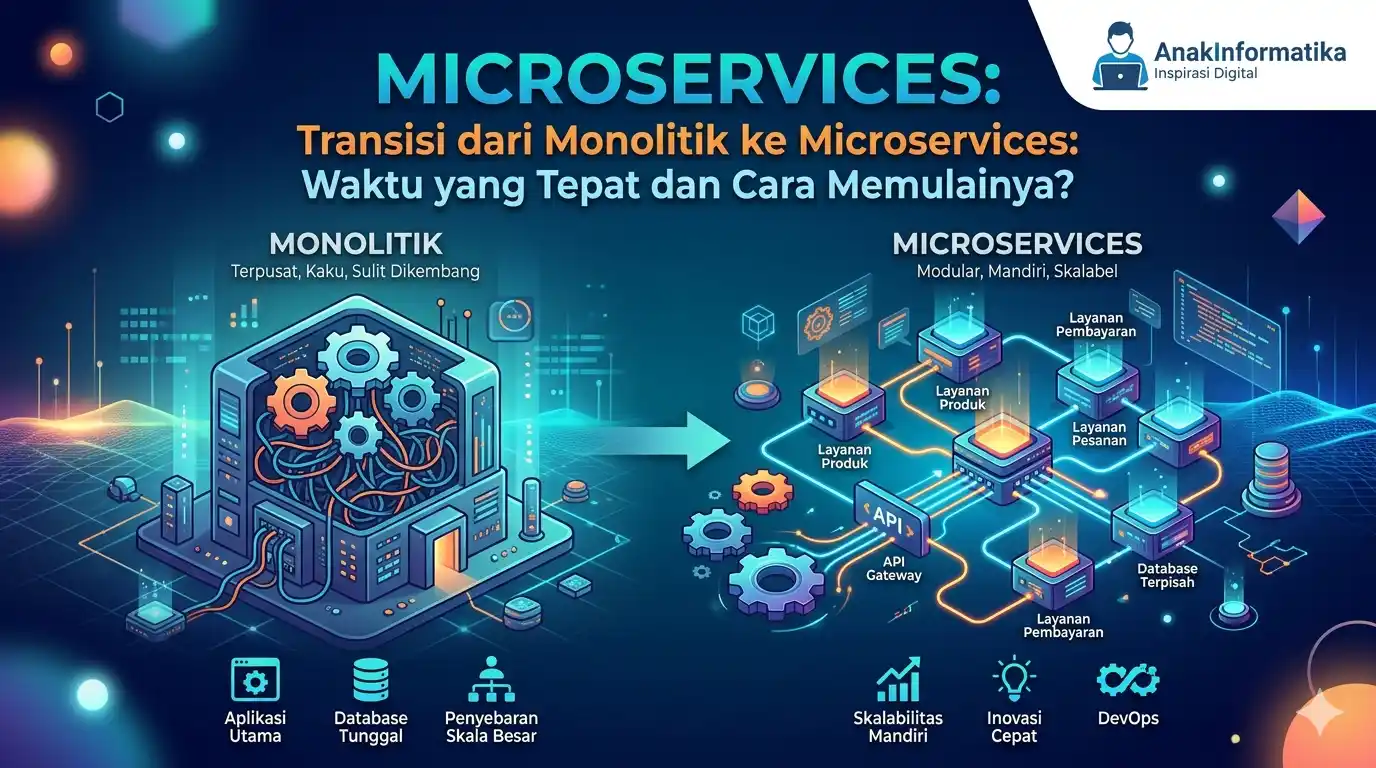
Welcome to the dynamic world of software development, fellow developers! If you've ever felt trapped by ever-growing monolithic complexity, slow deployments, or difficulty scaling, you're not alone. Many development teams reach a point where their once-efficient monolithic architecture becomes a bottleneck. This is where Microservices emerge as a promising solution.
This tutorial will guide you through a crucial journey: Microservices: Transitioning from Monolithic to Microservices: When is the Right Time and How to Get Started? We'll discuss the signs indicating when you should consider this transition, effective strategies to begin, and most importantly, practical code implementation examples so you can try it yourself immediately.
Ready to unlock new potential in your application development? Let's dive in!
Prerequisites
Before we dive deeper, ensure you have a basic understanding and some installed tools:
- Basic understanding of programming (e.g., Python) and RESTful API concepts.
- Basic knowledge of Docker and Docker Compose.
- Git and terminal/command line.
- Your preferred IDE (e.g., VS Code).
Microservices: When is the Right Time to Transition from Monolithic?
Deciding to switch from monolithic to microservices is not a decision to be taken lightly. It's a significant investment in time, resources, and a shift in mindset. However, there are several clear signs indicating that it's time to consider this transition:
Signs Your Monolith Needs a Change:
- Slow and High-Risk Deployments: Every minor change requires deploying the entire application, which is time-consuming and increases the risk of failure.
- Scaling Difficulties: The entire application must be scaled, even if only one module requires more resources. This is inefficient and costly.
- Single Codebase, Multiple Teams Contending: Different teams must work on the same codebase, often leading to conflicts, complex dependencies, and slow development cycles.
- Obsolete Technology (Technology Debt): It's difficult to adopt new technologies or upgrade specific components because they are tightly coupled with the entire monolith.
- Increasing Complexity: The codebase becomes too large and complex for a single person, or even a team, to fully grasp. Bugs are hard to track, and adding new features becomes a nightmare.
- Resistance to Change: Fear of changing any part of the code because of the risk of unexpected side effects in other parts of the application.
Factors to Consider Before Transitioning
- Team Size and Experience: Microservices require teams that are more independent and experienced in DevOps. Small teams might struggle with the overhead.
- Business Domain Complexity: If your business domain is truly complex and can be divided into independent parts, microservices will be a great fit.
- Budget and Resources: This transition requires a significant upfront investment in infrastructure, tooling, and training.
- Scalability Needs: Are there specific parts of your application that require extreme scalability independently?
- Innovation Speed: Do you need to develop and deploy new features very quickly and independently?
If you see most of the signs above and the consideration factors are supportive, then it is the right time to start planning: Microservices: Transitioning from Monolithic to Microservices: When is the Right Time and How to Start?
How to Start? Strategies for Transitioning to Microservices
Performing a "big bang" transition (changing everything at once) from a monolith to microservices is a recipe for disaster. The most recommended approach is gradual, using tested strategies:
1. Strangler Fig Pattern
This is the most popular and safest strategy. The idea is to introduce new microservices alongside the existing monolith. Over time, functionality from the monolith is gradually "strangled" (moved) to the new microservices until the monolith eventually becomes very small or disappears entirely.
- Identify Bounded Contexts: This is the most important step. Use Domain-Driven Design (DDD) to identify independent and cohesive areas of functionality within your monolith. For example, in an e-commerce app, 'Order Management', 'Product Catalog', 'User Authentication', and 'Payment Gateway' are good examples of bounded contexts.
- Create a Facade/API Gateway: Place a layer in front of your monolith that will route requests to either the monolith or the new microservices.
- Extract the First Functionality: Choose one bounded context that is relatively small and not too critical, and extract it into an independent microservice.
- Route Traffic: Direct all requests related to the extracted functionality to the new microservice via your API Gateway.
- Repeat: Perform this process repeatedly until the entire monolith is broken down or most of its functionality has been moved.
2. Database per Service
To achieve true independence, each microservice should have its own database. This avoids dependencies between services on the same database schema, allows each service to choose the most suitable database technology, and facilitates independent deployment.
3. Inter-Service Communication
Services will communicate via APIs (RESTful HTTP is the most common) or through Message Queues/Brokers (e.g., RabbitMQ, Kafka) for asynchronous communication.
Implementation Steps: A Simple Transition Example
Let's simulate a transition from a simple monolith to microservices using Python (Flask) and Docker. We will start with a monolith that handles products and orders, then extract the product functionality into a separate microservice.
Project Structure
Create a folder structure like this:
Plaintext
microservices-transition/
├── monolith/
│   ├── app.py
│   ├── Dockerfile
│   └── requirements.txt
├── product-service/
│   ├── app.py
│   ├── Dockerfile
│   └── requirements.txt
└── docker-compose.yml
1. Initial Monolith (E-commerce Simulation)
This is our monolith that handles both product and order data simultaneously.
monolith/requirements.txt
Plaintext
Flask==2.3.3
requests==2.31.0
monolith/app.py
Python
import json
from flask import Flask, jsonify, request

app = Flask(__name__)

# Simulated data in the monolith
products_db = {
    "1": {"id": "1", "name": "Laptop XYZ", "price": 1200},
    "2": {"id": "2", "name": "Gaming Mouse", "price": 50},
    "3": {"id": "3", "name": "Mechanical Keyboard", "price": 100}
}

orders_db = []
order_id_counter = 1

@app.route('/')
def home():
    return "Monolith Application is running!"

@app.route('/products', methods=['GET'])
def get_products():
    """Fetch all products from the monolith database."""
    return jsonify(list(products_db.values()))

@app.route('/products/<string:product_id>', methods=['GET'])
def get_product(product_id):
    """Fetch specific product details from the monolith database."""
    product = products_db.get(product_id)
    if product:
        return jsonify(product)
    return jsonify({"message": "Product not found"}), 404

@app.route('/orders', methods=['GET'])
def get_orders():
    """Fetch all orders."""
    return jsonify(orders_db)

@app.route('/orders', methods=['POST'])
def create_order():
    """Create a new order. In a monolith, this accesses products directly."""
    global order_id_counter
    data = request.get_json()
    product_id = data.get('product_id')
    quantity = data.get('quantity')

    if not product_id or not quantity:
        return jsonify({"message": "Product ID and quantity are required"}), 400

    product = products_db.get(product_id) # Monolith accesses product data directly
    if not product:
        return jsonify({"message": "Product not found"}), 404

    order = {
        "id": str(order_id_counter),
        "product_id": product_id,
        "product_name": product['name'],
        "quantity": quantity,
        "total_price": product['price'] * quantity
    }
    orders_db.append(order)
    order_id_counter += 1
    return jsonify(order), 201

if __name__ == '__main__':
    app.run(host='0.0.0.0', port=5000)
monolith/Dockerfile
Dockerfile
FROM python:3.9-slim-buster
WORKDIR /app
COPY requirements.txt .
RUN pip install --no-cache-dir -r requirements.txt
COPY . .
CMD ["python", "app.py"]
2. Product Microservice
Now, we create a separate microservice responsible only for product data.
product-service/requirements.txt
Plaintext
Flask==2.3.3
product-service/app.py
Python
from flask import Flask, jsonify, request

app = Flask(__name__)

# Product data, now managed independently by Product Service
products_db = {
    "1": {"id": "1", "name": "Laptop XYZ", "price": 1200},
    "2": {"id": "2", "name": "Gaming Mouse", "price": 50},
    "3": {"id": "3", "name": "Mechanical Keyboard", "price": 100}
}

@app.route('/products', methods=['GET'])
def get_products():
    """Fetch all products."""
    return jsonify(list(products_db.values()))

@app.route('/products/<string:product_id>', methods=['GET'])
def get_product(product_id):
    """Fetch specific product details."""
    product = products_db.get(product_id)
    if product:
        return jsonify(product)
    return jsonify({"message": "Product not found"}), 404

@app.route('/products', methods=['POST'])
def add_product():
    data = request.get_json()
    product_id = data.get('id')
    name = data.get('name')
    price = data.get('price')

    if not all([product_id, name, price]):
        return jsonify({"message": "ID, name, and price are required"}), 400
    if product_id in products_db:
        return jsonify({"message": "Product with this ID already exists"}), 409

    products_db[product_id] = {"id": product_id, "name": name, "price": price}
    return jsonify(products_db[product_id]), 201

if __name__ == '__main__':
    app.run(host='0.0.0.0', port=5001)
3. Updated Monolith (Integrating Product Microservice)
We modify the monolith so it no longer stores its own product data; instead, it calls the Product Service.
monolith/app.py (Modified)
Python
import json
import requests # Added this
from flask import Flask, jsonify, request

app = Flask(__name__)

# PRODUCT_SERVICE_URL using Docker Compose service name
PRODUCT_SERVICE_URL = "http://product-service:5001/products"

orders_db = []
order_id_counter = 1

@app.route('/')
def home():
    return "Monolith Application (Order Service) is running!"

@app.route('/products', methods=['GET'])
def get_products_from_service():
    """Proxies request to Product Service."""
    try:
        response = requests.get(PRODUCT_SERVICE_URL)
        response.raise_for_status()
        return jsonify(response.json())
    except requests.exceptions.RequestException as e:
        return jsonify({"message": f"Error communicating with Product Service: {e}"}), 500

@app.route('/orders', methods=['POST'])
def create_order():
    """Create a new order by calling Product Service."""
    global order_id_counter
    data = request.get_json()
    product_id = data.get('product_id')
    quantity = data.get('quantity')

    try:
        product_response = requests.get(f"{PRODUCT_SERVICE_URL}/{product_id}")
        product_response.raise_for_status()
        product = product_response.json()
    except requests.exceptions.RequestException as e:
        return jsonify({"message": "Product not found or service error"}), 404

    order = {
        "id": str(order_id_counter),
        "product_id": product_id,
        "product_name": product['name'],
        "quantity": quantity,
        "total_price": product['price'] * quantity
    }
    orders_db.append(order)
    order_id_counter += 1
    return jsonify(order), 201

if __name__ == '__main__':
    app.run(host='0.0.0.0', port=5000)
4. Docker Compose for Orchestration
docker-compose.yml
YAML
version: '3.8'

services:
  monolith:
    build: ./monolith
    ports:
      - "5000:5000"
    environment:
      PRODUCT_SERVICE_URL: http://product-service:5001/products
    depends_on:
      - product-service

  product-service:
    build: ./product-service
    ports:
      - "5001:5001"
5. Running the Application
Run the following command in the root folder: docker-compose up --build
Practical Tips and Best Practices
- Start Small: Don't try to break down all features at once. Choose one piece that is easiest or most beneficial to extract first.
- Invest in Automation (CI/CD): Microservices require frequent and independent deployments. Automation is key.
- Monitoring and Logging: Use centralized monitoring tools (e.g., Prometheus, Grafana, ELK Stack) and distributed logging.
- API Gateway: Consider using advanced gateways (e.g., Nginx, Kong) for routing, auth, and rate limiting.
- Asynchronous Communication: Use message brokers (Kafka, RabbitMQ) for operations that don't need instant responses to increase resilience.
- Data Consistency: Learn patterns like the Saga Pattern for distributed transactions.
- Autonomous Teams: Form small teams with full responsibility for one or more microservices, from development to operations (DevOps).
Conclusion
Transitioning from Monolithic to Microservices is a challenging but rewarding journey. By understanding when to transition, applying the Strangler Fig strategy, and starting with gradual implementation, you can unlock better scalability and development speed.
Remember, it’s not just about technology, but also about cultural and process changes. Happy exploring the world of microservices!, AnakInformatika.