

Welcome to the world of computing, where innovation never ceases! If you're an aspiring programmer, developer, or simply want to understand the devices you use daily, one of the most crucial foundations is understanding hardware types and their roles. Like a human body, hardware comprises the bones, organs, and muscles that enable software to live and function. Without a strong grasp of hardware, we'd merely see computers as "magic boxes" without knowing how they truly operate.
This article will guide you to comprehensively understand the physical components that form a computer system, how they interact, and why each part plays an irreplaceable role. Let's begin our journey to uncover the secrets behind your monitor screen!
What is Hardware? The Physical Foundation of the Digital World
In simple terms, hardware refers to all the physical components that constitute a computer system or any other electronic device. It's everything you can touch, see, and feel. Unlike software, which consists of intangible instructions or programs, hardware is the tangible infrastructure that executes those instructions. From personal computers, laptops, and smartphones to supercomputer servers, all are built upon a robust hardware foundation.
Understanding hardware is crucial not only for computer technicians or engineers but also for every individual interacting with technology. For a programmer, comprehending the limitations and capabilities of hardware can aid in writing more efficient code and optimizing application performance. So, let's dive deeper to specifically understand hardware types and their roles.
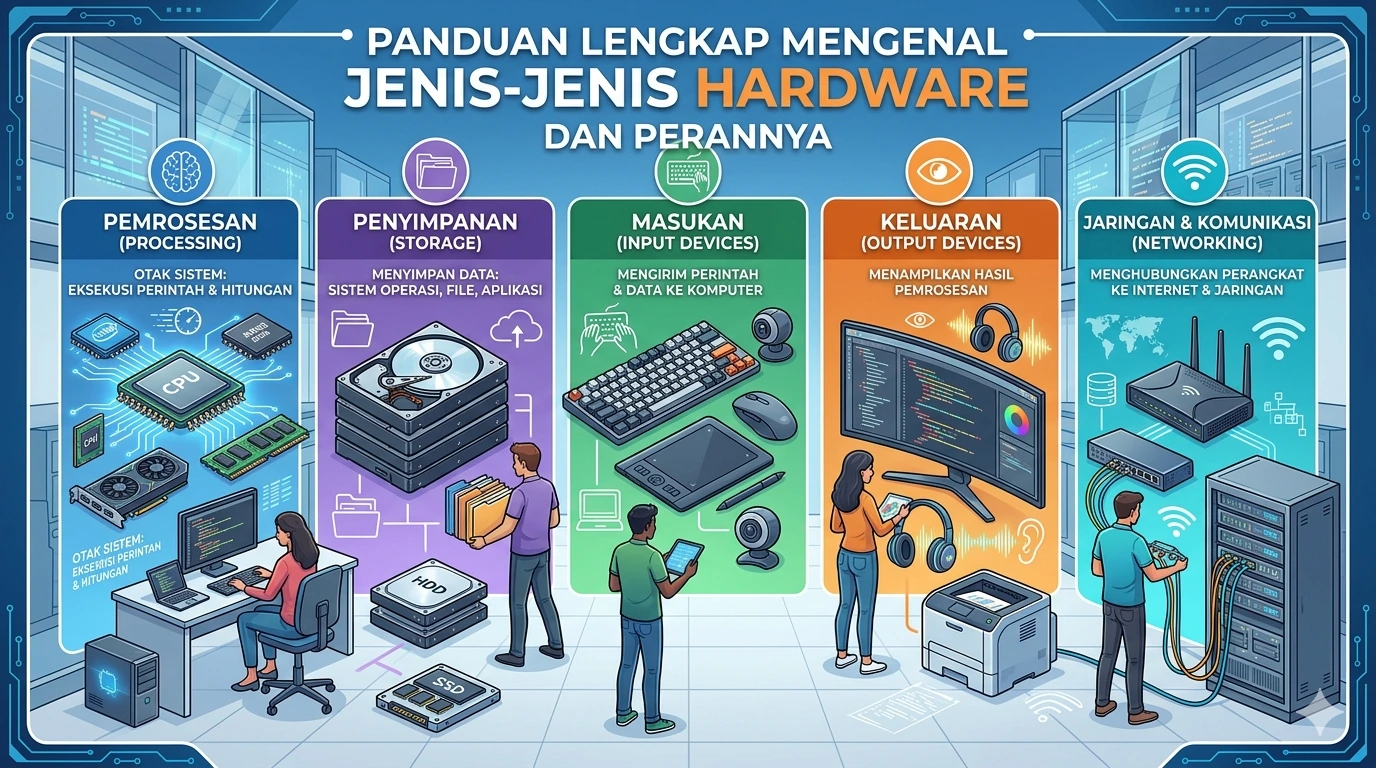
Main Hardware Categories and Their Functions
Computer hardware can be grouped into several categories based on their primary functions. Each category plays a vital role in the data processing cycle.
1. Processing Hardware
This is the "brain" and "heart" of every computer system, where all calculations and instructions are processed.
- Central Processing Unit (CPU): Often referred to as the processor, the CPU is the primary component that executes instructions from computer programs. Its speed (measured in GHz) and number of cores significantly determine how quickly a computer can perform tasks. Popular examples include the Intel Core i series and AMD Ryzen.
- Random Access Memory (RAM): RAM is short-term memory used by the computer to store data and instructions currently in active use. The larger the RAM capacity, the more programs can run concurrently without slowing down. It is "volatile" memory, meaning its data is lost when the computer is turned off.
- Graphics Processing Unit (GPU): Originally designed specifically for processing graphics and video, modern GPUs are now also used for complex parallel computations, such as in artificial intelligence, machine learning, and cryptocurrency mining. They can be integrated into the CPU (iGPU) or separate as a dedicated graphics card (dGPU).
2. Storage Hardware
These components are responsible for storing data permanently or semi-permanently.
- Hard Disk Drive (HDD): A traditional storage medium that uses spinning magnetic platters to store data. It offers large capacities and is relatively affordable but is slower and more susceptible to physical damage compared to SSDs.
- Solid State Drive (SSD): Uses flash memory to store data, similar to a USB flash drive. SSDs are significantly faster in reading and writing data than HDDs, more shock-resistant, and power-efficient, although they are more expensive per gigabyte.
- Flash Drive (USB Drive) and Memory Card (SD Card): Small, compact, and practical portable storage devices for transferring data between devices.
3. Input Hardware (Input Devices)
These devices allow users to enter data or commands into the computer.
- Keyboard: Used for entering text, numbers, and commands.
- Mouse: A pointing device used for navigating graphical interfaces and selecting objects.
- Microphone: For recording sound or inputting voice commands.
- Webcam: For capturing digital images and videos.
- Scanner: Converts physical documents or images into digital format.
4. Output Hardware (Output Devices)
These devices are used to display or present the results of data processing from the computer to the user.
- Monitor/Screen: Displays visual information. Resolution, size, and panel type (LCD, LED, OLED) affect display quality.
- Printer: Prints digital documents or images onto physical media (paper).
- Speaker/Headphone: Produces sound from the computer.
- Projector: Displays visual output onto a larger surface.
5. Networking Hardware
These components enable computers to connect and communicate with other computers or the internet.
- Network Interface Card (NIC): Also known as a network card, this component allows a computer to connect to a wired (Ethernet) or wireless (Wi-Fi) network.
- Router: A device that directs data traffic between networks, allowing multiple devices to share the same internet connection.
- Modem: Converts digital signals from a computer into analog signals for transmission over telephone or cable lines, and vice versa.
6. Motherboard
Not to be forgotten, there's one component that serves as the central hub for everything.
- Motherboard: This is the main circuit board that connects all other hardware components—CPU, RAM, GPU, storage, and I/O devices—enabling them to communicate with each other. The motherboard determines your system's compatibility and expansion capabilities.
The Crucial Role of Hardware in Modern Computing
After understanding hardware types and their roles, it's crucial to grasp why the combination and quality of hardware significantly determine our computing experience. For a programmer, for instance, adequate hardware means:
- Code Compilation Speed: Fast CPU and RAM shorten compilation times for large projects.
- Development Environment Efficiency: Sufficient SSD and RAM allow IDEs (Integrated Development Environments) to run smoothly and open multiple tabs or supporting applications without lag.
- Developed Application Performance: Good hardware during development can more accurately simulate the target environment, ensuring that created applications run optimally.
- Ability to Test Demanding Applications: If developing games, 3D applications, or AI-based software, a powerful GPU is essential for testing and debugging.
Hardware quality directly impacts your system's performance, stability, and capability limits. From playing demanding games, editing 4K videos, to running complex scientific simulations, all heavily rely on the synergy between hardware components.
Comparison Table: HDD vs. SSD
To provide a clearer picture of performance differences in storage hardware, let's look at a comparison between HDD and SSD, the two most common types of storage:
| Feature | Hard Disk Drive (HDD) | Solid State Drive (SSD) |
|---|---|---|
| Technology | Spinning magnetic platters | Flash memory (NAND chips) |
| Read/Write Speed | Slow (50-120 MB/s) | Very Fast (200-3500+ MB/s) |
| Durability | Vulnerable to shock, moving parts | Shock-resistant, no moving parts |
| Power Consumption | Higher | Lower |
| Noise | Present (from spinning platters) | None |
| Price per GB | Cheaper | More expensive |
| Ideal For | Large data storage, archives | Operating systems, applications, gaming, high performance |
From the table above, it's clear that while HDDs offer large capacities at an affordable price, SSDs significantly outperform them in terms of speed and durability, making them the primary choice for operating systems and applications requiring high performance.
Conclusion: Building a Strong Understanding
Understanding hardware types and their roles is a fundamental step for anyone wishing to delve into the world of computing. Every component, from the mighty CPU to the humble keyboard, plays a unique and essential role in the overall system's functionality. Hardware is the foundation that allows software—the world of code and programs—to run and interact with us.
With this knowledge, you'll not only be able to make better decisions when purchasing or upgrading devices but also gain a deeper appreciation for how the technology around us works. For "Anak Informatika," this hardware understanding is crucial for becoming a more proficient programmer or developer, capable of optimizing their code to work in harmony with the machine's physical capabilities. Keep learning, keep exploring, because the world of technology always offers something new to discover!